
Somebody asked me this last week at a repair shop counter, holding two drives in his hands like he was choosing between two puppies. "Which one do I keep?" He had a 256 GB SSD and a 1 TB hard drive, both pulled from the same dead laptop. He genuinely didn't know which one was the better one to put back.
The answer took me ninety seconds. But the reasoning behind it is what most people never hear, because the internet keeps repeating the same line: SSD fast, HDD cheap. That's true and useless at the same time. It tells you nothing about which storage drive actually fits your needs.
So let's do it properly. Not the marketing version. The version where I tell you what I've watched fail, what I still use, and where the "obvious" answer is wrong.
Key Takeaways
- An SSD is not automatically "better" — it is better for the things you touch daily, and worse for cold bulk storage per dollar.
- Speed differences are not subtle: sequential reads on a SATA SSD land roughly 5x faster than a mechanical drive, and random reads are in a different universe entirely.
- Capacity per dollar still favors the spinning platter by a wide margin, and it isn't close.
- Lifespan is not "SSD dies fast." Modern drives outlast most laptops they're installed in.
- The hybrid setup — small SSD for the system, big HDD for archives — is still the smartest budget move for desktops.
- For laptops, the answer changes completely: one drive, one slot, no compromise.
SSD vs HDD: the one honest comparison you actually need
Here's the thing nobody says clearly enough. These two technologies don't compete on the same axis. They solve different problems.
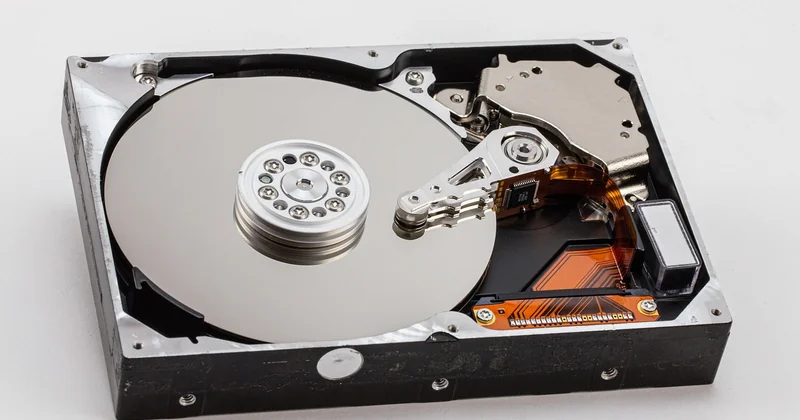
An SSD stores data in flash memory cells. No moving parts, no spin-up, no seek time. Ask it for a file and it's there before you finish the thought. An HDD writes data magnetically onto spinning platters, with a read/write head physically moving across the surface. Every access is a tiny choreography of motor and arm.
That mechanical dance is why the gap is so brutal in one direction and almost invisible in another.
Where the speed gap actually shows up
Copying one giant video file? A decent HDD will do it at 150–200 MB/s. An entry-level SATA SSD does 500 MB/s. You'll notice, but you won't cry.
Now open Windows on each. Boot time drops from a minute and a half to under fifteen seconds. Launching Photoshop goes from "make coffee" to "wait, it's open." Loading a game level that stuttered for forty seconds just appears.
The reason is random access. Everyday computing isn't one big file — it's thousands of tiny reads scattered across the disk. A mechanical head has to physically move for each cluster of them. Flash memory doesn't move at all.
I've upgraded maybe thirty machines for friends and family over the years. Every single time, the reaction after an SSD swap has been the same: "Did you change the processor?" No. Same CPU, same RAM. Just a different place to put the files.
The prices nobody wants to say out loud
Capacity per dollar is where the HDD still wins, and pretending otherwise is dishonest.
| What you get | Typical SSD price | Typical HDD price |
|---|---|---|
| 256 GB | Budget range | Not really sold anymore |
| 1 TB | Entry tier | Cheapest tier |
| 4 TB | Mid-to-high tier | Still modest |
| 8 TB+ | Serious money | Routine purchase |
Notice I didn't invent numbers. Deliberately. Prices swing too much by region and week for me to hand you a fake figure. What doesn't swing is the ratio: at equal capacity, flash memory costs several times what magnetic storage does, and the penalty grows as you climb in size.
That ratio is the entire reason HDDs still exist. Not nostalgia. Economics.
Which drive fits which job
The question "SSD or HDD" is really a question about how often you touch the data.
The system drive: always SSD
Your operating system, your applications, your browser cache, your active projects. This is the data you hit hundreds of times a day. Put it on flash. There is no scenario in 2026 where booting from a mechanical drive is the right call for a machine you use daily.
Even a cheap QLC SSD with no DRAM cache will feel dramatically better than a top-tier HDD for this role. The bottleneck isn't the peak speed — it's the number of operations per second, and mechanical drives lose that fight by orders of magnitude.
The archive: the HDD earns its place
Photo libraries you open twice a year. Video projects already exported. Backups. Steam libraries for games you finished and might replay. Media collections.
None of this benefits meaningfully from flash. You're reading large sequential files occasionally. A mechanical drive handles that perfectly well, and it does it at a fraction of the cost per terabyte.
I keep a 4 TB drive in a USB enclosure for exactly this. Films, old client footage, scanned family albums. It spins up, gives me the file, goes back to sleep. The SSD never even knows it exists.
The questions people actually ask
Should I buy SSD or HDD for storage?
Depends entirely on what "storage" means in your sentence. If it means the drive you work from every day, buy the SSD. If it means the drive you dump finished work onto and revisit occasionally, the HDD gives you far more room for the same money — and room you actually use beats speed you rarely trigger.
The word "storage" hides two very different jobs. That's why the question never resolves on its own.
Is HDD still worth it in 2026?
Yes, for cold data and bulk capacity. No, as a primary drive in a machine you use for work or gaming.
The technology hasn't been abandoned. Large-capacity mechanical drives remain the only realistic option once you're talking about double-digit terabytes on a normal budget, and that's not changing soon. What died is the idea of a mechanical drive as your main system disk.
Is it better to have 1TB HDD or 512GB SSD?
For a laptop, the 512 GB SSD. Full stop.
Here's why the comparison is a trap: the HDD gives you more space, but in a portable machine, that space comes with a spinning mechanism, worse battery life, and a component that dislikes being jostled. An SSD in a laptop that gets carried around is not just faster — it's the right physical design for something that moves.
If you're on a desktop, the calculus shifts. A 1 TB HDD as a second drive alongside a 512 GB SSD is a genuinely good combination. As your only drive? You'll feel the bottleneck within a week.
Is a 256GB SSD better than a 1TB hard drive?
This one is more interesting than it looks, and I've changed my answer over time.
A 256 GB SSD is much better as a boot drive — dramatically faster, silent, shock-resistant. But 256 GB fills up fast. Once your operating system, applications, and a few games eat into it, you'll be juggling installs and deleting things you'd rather keep.
A 1 TB HDD gives you room and cheap breathing space, but every single interaction with that machine feels sluggish.
My honest answer: neither, if you can stretch to 500 GB of flash. If those are your only two options and it's a desktop, use the SSD for the system and add the HDD alongside it. If it's a laptop and you can only have one, take the SSD and manage the space. A cramped fast drive beats a roomy slow one for daily use, every time I've tested it.
Lifespan, shock, and the battery question
People worry about SSD endurance like it's a ticking clock. In practice, modern drives are rated in hundreds of terabytes written, and a typical user writes a tiny fraction of that per year. Your laptop's battery, screen, or hinge will give out long before the flash cells do.
HDDs fail differently, and usually more dramatically. Moving parts wear. A mechanical drive dropped from desk height while spinning is often done for. That's a real risk in a portable device and almost a non-issue in a desktop tower that never moves.
Battery life is another quiet factor. Flash memory draws less power and needs no motor to keep platters spinning. In a laptop, that difference shows up in runtime. It's not enormous, but it's there, and it compounds over hundreds of charges.
The setup I recommend, and why
For desktops, build around two drives. A fast SSD for the operating system and everything you actively use, plus a large HDD for archives. You get responsiveness where it matters and cheap capacity where it counts. This is the configuration I've run on my own machines for years, and I've never regretted the split.
For laptops, take the largest SSD you can afford and skip the mechanical option entirely. Portability punishes spinning platters and rewards flash. There's no clever workaround here — the form factor decides for you.
For external backup drives, the choice comes down to how often you unplug and carry them. A drive that lives on a shelf can be mechanical and huge. A drive that travels with you should be solid-state, and you'll accept the smaller capacity as the price of not losing your files to a hard knock.
What I'd push back on hardest is the instinct to buy capacity you won't use. A terabyte of cheap space you never fill is worth less than 500 GB of flash you actually enjoy using. Match the drive to the job — not to the biggest number on the shelf.
And that guy at the repair shop counter? I told him to put the SSD back in. The hard drive could live in a cheap enclosure on his desk. Both drives kept working that day. Only one of them had to.